The number of companies introducing knowledge and information sharing tools to streamline internal information sharing is increasing.
Utilizing knowledge/information sharing tools that match each company's purpose will streamline operations and improve productivity, as well as revitalize internal communication.
However, information sharing tools that utilize personal terminals such as PCs and devices may not be sufficient.
Oversights, literacy problems, employees who don't have devices in the first place, and inability to share information with staff, etc.
In the current office environment where environmental changes are intense due to "work style reform" and "telework recommendations due to the COVID-19 pandemic," communication between employees has become a challenge.
It is difficult to prevent leaks in information sharing and encourage a common awareness when attendance statuses are fragmented.
Traditionally, phones, emails, and bulletin boards have been used, but today, convenient tools that further revitalize communication have emerged.
That is why digital bulletin boards (office signage) are attracting attention.
By installing a digital bulletin board, which has become common in advertisements and information boards in recent years, as an internal information sharing tool in shared spaces such as offices, entrances, and break rooms, and automatically displaying information in formats such as video, still images, and text, it becomes possible to share information and improve business efficiency within the company.
What is a digital bulletin board? Basic functions and features
A digital bulletin board is a system that delivers and displays information via a network on display devices such as liquid crystal displays and electronic paper.
[Main functions and features]
Automatic distribution: Content can be preset, allowing display switching according to day of the week or time Cloud management: Remote management and updates possible from PC or smartphone Diverse content support: Images, videos, PDFs, Web pages, etc. Installation flexibility: Can be placed according to use, such as in entrances, conference rooms, cafeterias, or factories Visibility and immediacy: Moving content catches the eye and enables real-time information delivery
The role of digital signage in internal information sharing
A digital bulletin board is not just a replacement for a notice board space. It is a "visual infrastructure" used for various purposes such as internal notices, business flash reports, safety information, and event announcements. By installing it on traffic lines like hallways and break spaces, you can create a mechanism where information naturally catches the eye and is reliably conveyed to employees. Particularly for non-desk workers and manufacturing/logistics sites, there are cases where the digital bulletin board functions as the "only reliable information channel".
Benefits of installing a digital bulletin board for internal information sharing
Benefit 1
Can eliminate information leaks and conduct awareness-raising
It is difficult to convey necessary information to various employees at the necessary timing, and even if notices and information from the General Affairs Department or Human Resources Department are sent out via email or internal information sharing tool chat, for employees where a large amount of email and contact come and go daily, the judgment of whether it is information that needs to be read is left to the receiving side.
As a result, there is a possibility that omissions will occur in information transmission.
Important information and notices from General Affairs and Human Resources cannot end with just being issued.
In that respect, by installing signage as a digital bulletin board and repeatedly distributing information you want employees to know, you can convey the same information to everyone in the office without omission and multiple times.
Flowing information repeatedly every day leads to awareness among employees. For example, when you want to permeate the consciousness of employees, such as notices of precautions and document submission deadlines, digital bulletin boards can be said to be effective.
Benefit 2
Can be utilized as a communication tool
Earlier, we introduced the use of disseminating information to employees without omission, but what is effective as content to be broadcast on a digital bulletin board is not just contact items and messages.
People who mainly do PC work do not have much opportunity to stand up, so there is a problem that they have few opportunities to know about exchanges and information with other departments. For example, displaying the date and content of internal events, or playing videos of new employee self-introductions or internal events, fun content that becomes a trigger for conversation between employees is recommended.
By broadcasting not only business-related content but also relaxing content like horoscopes or popular local restaurants, you can utilize break times to offer employees insights, thereby boosting internal communication and productivity.
Benefit 3
Emergency information can be shared smoothly
In emergencies such as typhoons and earthquakes, use real-time delivery to share information with employees.
It also serves as a means of ensuring safety.
In emergencies such as typhoons and earthquakes, use real-time delivery to share information with employees.
Benefit 4
Ability to provide information to staff who do not have computers
You can share information through a digital bulletin board even with staff who work in factories or warehouses and are not provided with company computers.
Communication using computers such as email creates discrepancies in information delivery for workers who rarely look at computers, such as factory workers and part-time staff.
With posters, etc., there is also the hassle of replacing them and the cost of printing.
Also, another benefit is that it is easier to catch the eye compared to posters.
Benefit 5
Can be utilized for introducing the company to guests from outside the company
The fifth merit is that it leads to introductions for people outside the company.
The office entrance and reception are the first points of contact with guests who have come to visit and business partners.
Therefore, by utilizing a digital bulletin board, you can effectively measure information transmission and branding.
As an example of content to be delivered, by having people watch the company's history, business explanation, strengths, product introduction, features, etc., while waiting at the entrance, it is possible to make them know the company effectively.
Additionally, you can display a floor map to tell customers where the department they want to visit is located and guide them.
Using signage can also appeal to an advanced office environment.
Merit ⑥
Avoiding confusion in unforeseen situations such as troubles
Digital bulletin boards also have great power in alerting employees.
If troubles, compliance violations, complaint information, etc., are displayed in a place where they are always visible, the attention level is high, which leads to preventing troubles before they happen and also raises internal awareness.
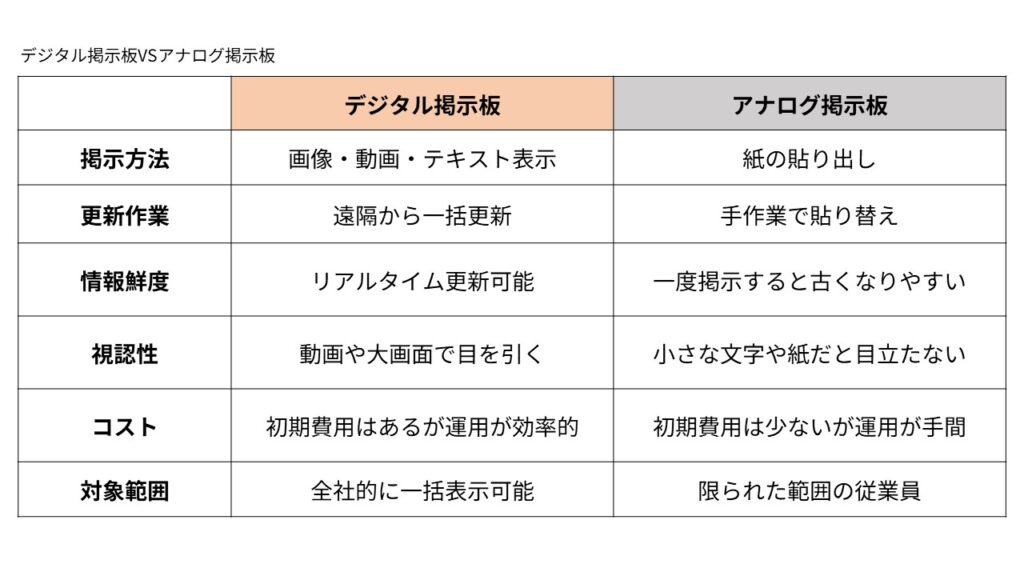
Analog vs. Digital Bulletin Boards
The merits of digital bulletin boards are,
Improved accuracy of information delivery: The same information can be delivered to anyone, anywhere, at the same time Business efficiency: No need for replacement or printing work, reducing management man-hours Improved visibility and memory retention: Easy to remember through appeal using movement and sound Immediate distribution of emergency information: Real-time notification possible during disasters or trouble Branding and fostering company culture: Sharing corporate climate and events with videos and photos
Especially if you use a cloud-type digital bulletin board system, collective delivery to multiple bases and schedule management become possible, evolving from a "bulletin board to see every day" to a "strategic internal public relations tool".
What kind of digital bulletin board is suitable for internal information sharing
We have explained the benefits and expected effects of introducing digital bulletin boards to the office, but a common concern when considering actual implementation is how to distribute content to the signage.
There are broadly two types of signage introduced as digital bulletin boards: standalone type and cloud type.
First, let's grasp the difference between these two.
Standalone type
Insert a USB memory or SD card into the signage (display) and display the same video data, etc., periodically and repeatedly.
Merits
Since an internet environment is not required, you can use it just by installing it.
Disadvantages
Since you cannot easily change the delivery content such as swapping USBs, it takes time and effort if there are many updates.
Also, when updating information, you need to operate each signage one by one.
Cloud-type
Upload images and videos to the cloud and display them on each monitor.
Cloud-type signage is suitable for sharing information that needs to be conveyed in real-time, such as sales flash reports and room availability information.
Merits
Information can be updated collectively even for multiple offices and factories located in different places.
Since information can be shared in real time, it can be said that it is suitable for business offices.
Disadvantages
A network environment is required.
In these days when many companies have introduced telework and the number of times coming to the office has inevitably decreased, I think many people feel that the work of dropping content into a USB or SD card, coming to the office, and inserting it into signage is troublesome.
A cloud-type is suitable for office signage utilized as a digital bulletin board.
Recommended tools for internal digital bulletin boards
Among the many cloud-type signage systems, the one we recommend for office use is "Clomoni".
"Clomoni" can be set up through a simple initial task of just connecting the signage to an HDMI cable at the time of installation.
Due to the cloudification of digital signage, content delivery can be performed from a home PC, so you can work without problems even during telework, etc.
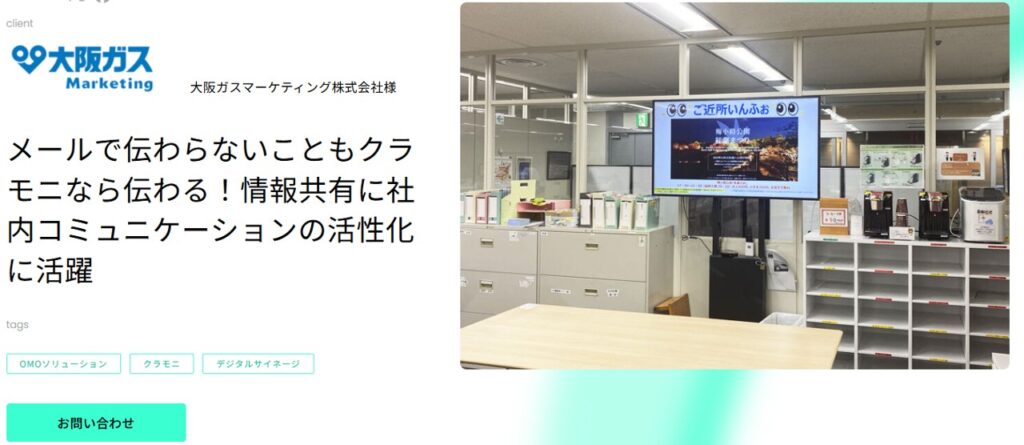
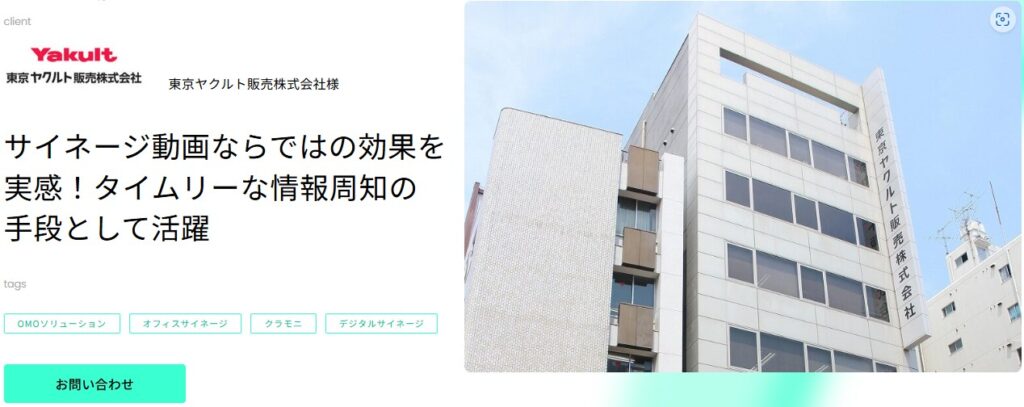
"Clomoni" has a proven track record of implementation across various industries and companies.
The reasons why it is chosen are,
Clomoni is a multi-functional cloud signage!
・Deliver diverse content freely
With WEB-based HTML operation, you can support a wide range of file formats and freely distribute diverse content. In addition to images and videos, you can also easily register PDFs and WEB pages as they are. This saves the trouble of file conversion and allows you to smoothly distribute the latest information.
・Intuitive and Easy-to-Use Simple UI
The management system of Clomoni, which was originally evaluated as easy to use, has evolved further with this renewal. The design has been revamped and operability has improved significantly. Procedures for schedule management and information updates have been simplified, and management of multiple bases has become smoother. Designed so that anyone can operate it intuitively without hesitation, reducing daily operational burdens.
・Evolving Signage
System design that can meet diverse needs such as 4K support and multi-display operation. Furthermore, this winter, we plan to develop "UGC Clomoni" which visualizes e-commerce and social media reviews at the store. We will support a store experience that continues to evolve with a stable system foundation that looks ahead to long-term operation.
・Maintenance and Support
There is also a high evaluation in terms of operation support, such as nationwide installation, reliable maintenance and warranty, and response to inquiries on how to use it.
Internal information sharing and communication are indispensable initiatives for companies, and with the significant changes in the environment in recent years, their importance has become even greater.
With knowledge/internal information sharing tools, literacy is required for both the operating side and the receiving side.
With mailing lists or emails that you have to go out of your way to see, you tend to put off opening them.
However, analog bulletin boards such as paper are not conspicuous, tend to be messy, and nobody ends up looking at them.
In that respect, digital bulletin boards utilizing cloud signage are always in places where employees' eyes go and pass by, and they can convey information along with movement and sound.
If internal information transmission and information sharing go well and internal communication is revitalized, it should lead to employee satisfaction and further to customer satisfaction.
"Clomoni" can provide one-stop solutions, from hardware to content production and distribution.
If you let us know your wishes, we will propose the optimal solution.
A1. A digital bulletin board is a system that distributes and displays information via a network to display devices such as LCD screens. It allows for remote management of diverse content such as images, videos, and PDFs via the cloud, and enables automatic distribution according to a preset schedule.
Q2. What are the merits of installing a digital bulletin board for internal information sharing?
A2. The main benefits are that it prevents leaks in information delivery by repeatedly distributing necessary information, and that it can revitalize internal communication by utilizing videos and the like. Also, emergency information during disasters can be distributed in real-time, and information can be reliably delivered to staff who do not own computers.
Q3. What types of digital bulletin boards are there?
A3. There are mainly two types: the "standalone type" and the "cloud type". The standalone type does not require an internet environment because it is used by inserting a USB, but updating it is time-consuming. The cloud type is suitable for office use because information updates and schedule management can be done collectively from a remote location.
Q4. What are the features of the cloud-type signage system "Clomoni"?
A4. "Clomoni" is a multi-functional cloud signage that can freely deliver diverse content such as images, videos, PDFs, and web pages. It is equipped with a simple operation screen that is intuitive and easy to use, and is evaluated for providing one-stop support from installation to maintenance and operation.